Showing posts with label ipad. Show all posts

Thursday, 8 November 2012

Working with ten frames and Doodle Buddy

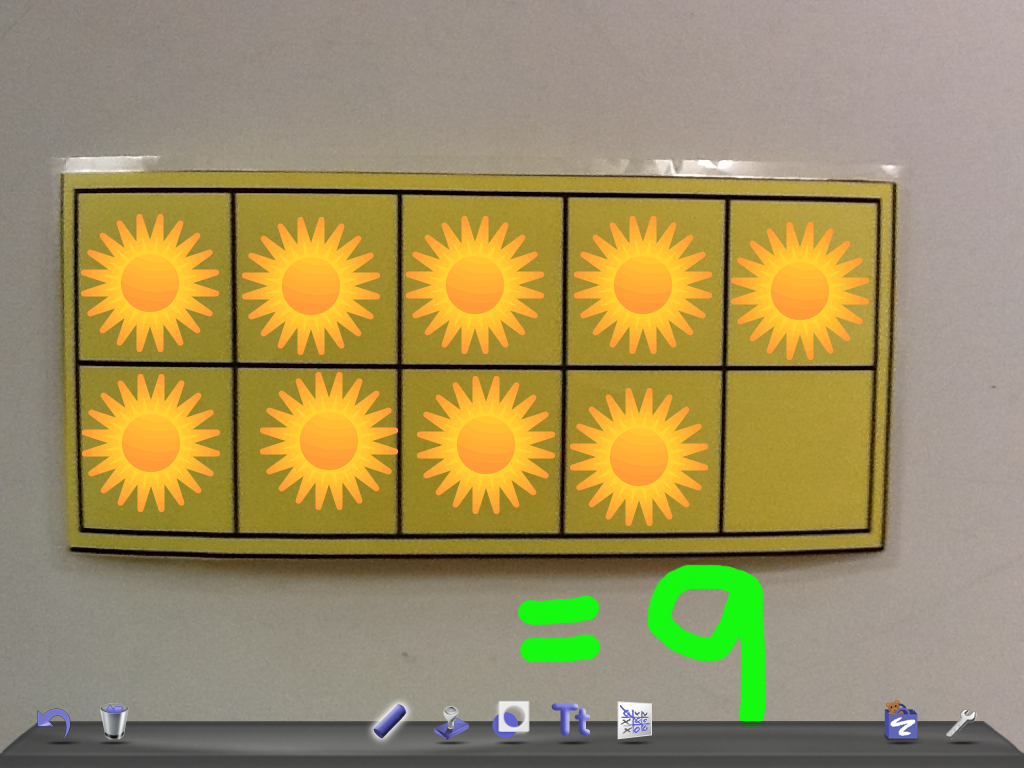
Today we used our iPads to work with ten frames. We are learning how to use this graphic organizer to help us count and have a quick idea of 'how many' we can see.

Students took a photo of the ten frame graphic organizer and then opened it in Doodle Buddy. Then they worked in groups of two to represent different numbers from 1-12. They used the stamps to quickly show the number to their partner.


It was simply another way to work with the iPad. Students have math bags in their desks that include a ten frame and counters. However, I wanted to show the students another way that the iPad can be used as a tool for learning. The iPad won't replace manipulatives, but it is another fun way to be 'hands on' with the concept (and they love to laugh at the sounds the stamps make-any lesson with laughter is one that they will remember!).


Tuesday, 10 January 2012

Audio memos and reading fluency

At this point in time I have one iPad to use with my whole class so I needed to get creative on how to use it. I wanted to start with something small and simple. I do guided reading with my students on a daily basis. My 23 students are separated into 5 reading groups based on ability. We predict, read, discuss, connect, think about, and interact with a book as a small group. While I am reading with one group the other students are re-reading and completing some reflections about what they have read. As there is only one of me it is hard to move around and have a chance to spend quality time with each group. I had an idea that the iPad could fill that hole to a certain extent.

This week I introduced the use of audio memos with guided reading. I decided to start by simply recording the students are they read the book aloud. I placed the iPad in the middle of the table, opened the audio memo application, and simply pressed record. Students took turns reading the book and at the end I stopped the recording. I wrote a title (group name) and it was automatically dated. Then we listened to the memo as each student followed along in their book with their finger. It was amazing to watch their faces light up as they heard themselves read. I let them lead the discussion around the things that they noticed upon listening to the recording. After the discussion, we decided to read the book again and see if there was a difference in their fluency.

This was a great first step into using the iPad with my students. I found it very exciting. It was neat to see how the students enjoyed hearing themselves read. I know tape recorders have existed forever but in my humble opinion there are so many more things that can be done using this technology plus the potential for the students to use it independently is intriguing.

My next step is to try and figure out how to email the audio files out to parents to share their child's reading. When I tried to email the files it said they were too big.....I am going to have to do some research and investigate this a little more and then report back. I am still wondering how I am going to compile the audio files in one place. When I get the other iPads I could give one to each group to record their read aloud without me being present. This would provided some accountability and they could do some self analysis. However, it will mean that the audio files are each stored to single iPads so I need to figure out how to save them all in one place. I'm sure there is a simple way to do this so I will just do a little more investigating.

Friday, 6 January 2012

My new iPad! A list of classroom friendly apps

The purpose with this blog is to share with others my struggles, successes, frustrations and discoveries using the iPad with my grade one French immersion class.

I wrote a proposal in October to my school district around exploring the use of iPads in a primary French immersion classroom. In November I received my first iPad. It has taken me a long time researching applications to finally choose some to be uploaded to my iPad to use with my grade one French immersion students.

I came upon my first hurdle trying to find relevant and 'good' applications to use with my French class. Now I am a complete beginner using this technology so please forgive me if I make simple mistakes. I began by searching the apple store but quickly realized that this was not a very efficient way to go. Then I used the web to find other blogs and youtube videos with lists created by educators for educators. I found many great applications but not many in French. Then I stumbled upon these different search engines that allow you to view the most popular applications by country and therefore in the language of preference. I used one called "Countries top Apps!" Between this new search tool, blogs, and youtube, I quickly became overwhelmed by applications. After some trial and error with my own four year old, I chose a list of applications and began to upload them to my iPad.

Below is a 'working' list of the applications I am using with my students. I am sure I will add and substract applications from this list as I learn and explore.


General
App
Cost
Description
google search
Free
An internet search engine
chaîne météo
Free
Weather in France
You can change the city but then it seems to default to English
google translate
Free
Simple and very basic French to English or English to French translation tool
It has an audio function to say the word out loud as well
audiomemos
Free
To record audio (record child reading the story, or adult etc)
You can send audio files as an email
Radio Canada
Free
French radio
Talking Tom
Free
Fun way to have a character repeat back what is said (audio recording)
Make dice lite
Free
You can make a number of dice i.e. write topics for writing, questions such as who, what, where and when, or add numbers
google earth
Free
Bird’s eye view of earth that you can zoom in and out of
Petit Quotidien
free
French newspaper for kids ages 6 and up
I have not figured out how to get the full version because you have to put in a phone number from France or something??
Time Timer
$6.99
Custom settings
La coccinelle
By Gallimard Jeunesse
$3.99
An amazing interactive app with beautiful ladybugs that move as the narrator shares information
It is a very unique app (one of my personal favourites)
 
Books
App
Cost
Description
3 Petits cochons
By Gallimard Jeunesse
$3.99
A beautiful and interactive story
When students touch the characters they speak (a personal favourite)
Cendrillon by Gallimard Jeunesse
$5.99
A beautiful and interactive story
When students touch the characters they speak (a personal favourite)
Le petit chaperon rouge (My first interactive Freanch book)
$1.99
The words are highlighted as the story is read
Boucle d’or et les trois ours (iPhone app) les contes classiques
$0.99
The book can be read with or without text
Les copains de la forêt
free
The story has a few interactive features such as breaking words into syllables, showing the vowels and the silent letters in French
It is otherwise a basic French story


Printing and letter names
App
Cost
Description
abcTrace
$0.99
Practice at tracing and writing the letters in French
For the most part the directions are good but it does not follow the “Writing without tears” approach to letter formation
ABC tracing

An excellent app for practicing writing but it is in English so turn off the volume
iAlphabet

It has 3 functions: letter names, printing practice (just ok), and choose the right letter
Ok for very early primary letter recognition

Puppets show and story creation                                                                       
App
Cost
Description
PuppetPals HD
Free
You can purchase the app to be able to import your own pictures
Create puppet shows and record your own audio in French
You can export to youtube or email the video
Sock Puppets
Free
Record audio in French to create your own sock puppet shows
You can export to youtube
Our Story
Free
Upload photos and add text to create a meaningful story
Comic Lite
Free
Create a comic strip with thought and speech bubbles
Import pictures to create your story
You can email completed comics
There is a full version that allows you to do more
You can create slideshows with the images to make a story or presentation


Games
App
Cost
Description
Famille Lite
Free
Fun quiz game for more intermediate students
MotsMélés
Free
Crosswords have already been created and they are ok
More for grade 3 and up
TicTacToe Plus
Free
Simple tic tac toe game (English)

Math
App
Cost
Description
KIDpedia
Free
The free version only includes the shapes
Students can create a shape picture and the shape audio is French
Purchase the full version to learn more vocabulary
Numberland
$4.99
For early primary only because numbers are only to 10
Very interactive and fun
Feed Me!
Free
Find the solution to very simple (early primary) math problems and feed them to the monster
Calculator
Free
Simple calculator

Photos
App
Cost
Description
fotopedia
Free
Beautiful photos of Paris
Animoto
Free
Very easy to create a video with music and photos that you take
Full version allows more functions

Art
App
Cost
Description
Louvre
Free
a beautiful app create by the Louvre in Paris that includes works of art and descriptions but they are in English
Cluny (iPhone app)
Free
Musée National du Moyen Age guided visits in French
CultureClic (iPhone app)
Free
Images and art examples with French descriptions

Drawing (all English)
App
Cost
Description
HelloCrayons
Free
Drawing with crayons
HelloPencilCrayons
Free
Drawing with pencil crayons
Doodle Buddy
Free
Drawing application
Whiteboard

Whiteboard drawing application that can be using with another iPad cooperatively
Doodle Kids

A neat drawing on a black background with rainbow colours and shpaes
TypeDrawing
Free
You type in words and then use the words to draw pictures
Face iMake
Free
A very creative app where students can use different found objects to create funny faces